Web Design

Image retrieved from https://cdn.pixabay.com/photo/2016/08/27/12/06/website-1624028_1280.png

My new class has started and it is all about web design. I’m not going to lie, just seeing the textbook we were assigned made me scared for the class because of how big the book was and seeing what we had to work with made my brain hurt. HTML code seemed very confusing at a first glance, but it is pretty straight forward once I saw a demonstration of how it is used to create websites. Who knew all you needed was a word processor and a browser and anyone could easily create a website once they become familiar with the language.

Turns out, HTML is a markup language meaning it is mostly used to create the overall layout, contents of the page, and its structure; not necessarily to make the website functional. You need to use CSS to stylize the look of the web page which includes things like adding colors, changing fonts and their sizes, and much more. To make the web page functional in aspects like having a login screen or submitting a form, you need to use a programming language like JavaScript. JavaScript is way more complicated than the first two I mentioned and it is partly why many people, including me, get scared at just seeing any form of coding at all.

Luckily, this class is only going to cover HTML and CSS. However, I have made a note of possibly learning a programming language in the future as it could be highly beneficial for me to learn.

Conclusion to Post Production

Image retrieved from https://cdn.pixabay.com/photo/2015/04/03/16/36/bee-705412_1280.png

This past month I have gone through many frustrations, lack of sleep, and many tutorials to create my projects for the class. And I can say, I have learned so much and improved immensely.

Adobe After Effects scared me at first because there are an infinite amount of effects and variations of the effects you can create and animate every little property for it. That can be said for any program as creating something from scratch becomes difficult because one may not know where and how to begin. However, as I got more and more familiar with the program I began to have more and more fun creating my projects.

I found it difficult to create ideas that I had visualized and wrote down in After Effects because certain aspects wouldn’t look as I visualized it. Despite it not looking like I wanted it to, I ended up creating things I never thought I would be capable of and ended up liking how it turned out.

This will be the first time I share a link to one of my projects on this blog, but I liked how the project came out. I might revise it a little in the future and repost it as I got some suggestions in class on how to improve it. If I had finished my kinetic typography project at the time of posting this blog I would have chosen to show that one off on here, but alas I have not finished it yet and should probably stop procrastinating on doing the finishing touches of that project.

Motion Graphics

Image retrieved from https://cdn.pixabay.com/photo/2017/09/08/21/39/spiral-2730290_960_720.jpg

For this month’s class, I am learning how to use the program Adobe After Effects. My first project involves creating a motion graphic about what is graphic design or a self-introduction. I decided to go for a self-introduction piece about how growing up took me down the path of becoming a Graphic Designer.

I have learned many simple ways on how to animate certain shapes and lines from tutorials and somehow incorporated the knowledge I gained into my project. I sometimes forget that I am a beginner and are quick to judge my work, but the reality is that it is okay if it does not look great now because I don’t have all the tools, knowledge, and experience to get to where I want to be at the moment. As long as I am learning how to begin and how to improve is all that matters at the moment. Just making something move and being able to finish a project makes me feel accomplished to strive to learn more and improve my artwork.

As for motion graphics, they are quite fascinating to look at. It takes a lot of time to put things together if you are having many things move at once, but the finished product is amazing. I will insert a YouTube video of an example that I saw that looked well and inspired me for creating my project.

Visual Effects and Special Effects

I never quite knew the difference between special effects and visual effects because to me they were the same thing. As it turns out they are quite different but their purpose and importance are fairly the same. They are used to enhance the film, movie, or video to make the impossible, possible and catch the audience’s attention. They make you go “oooh” and “ahhhh” and make you feel that your mind has been blown. The most important thing to keep in mind when adding these effects is to know when to stop and when it is enough as you cannot use so many effects that it takes away from the story.

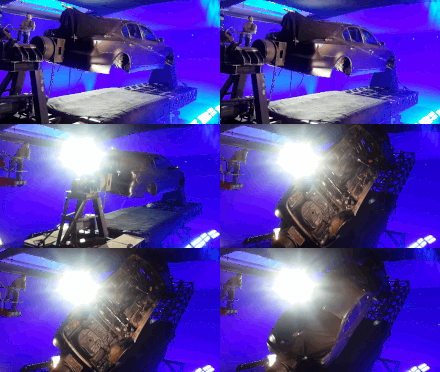
As for the difference between the two, special effects are those that can be captured during filming while using physical and tangible objects that need minor computer alterations to capture its full effect. These effects are things like gunshot wounds, spurts of blood in gory films, facial scars, and so on.

Gif retrieved from https://upload.wikimedia.org/wikipedia/commons/thumb/3/3f/Rig_%26_Gimbal_Mechanical_Special_Effects.gif/220px-Rig_%26_Gimbal_Mechanical_Special_Effects.gif

Visual effects are those that are added through various computer programs. These are things like using green screens to project a different background, changing the physical appearance of someone to make them look like a monster, and painting on things like landscapes that aren’t there but appear to be there.

Image retrieved from https://cdn.pixabay.com/photo/2018/04/21/13/52/female-3338533_1280.jpg

The adding of visual effects take place in post-production. Depending on how big the project is, it may take a whole team of people to produce these various effects.

Post Production

Image retrieved from https://cdn.pixabay.com/photo/2017/04/05/15/36/film-2205325_1280.jpg

A new month has started which means a new class for me! The concept of time always amazes me because when you are enjoying your time and having fun, time tends to go by much faster, which is the case for me now. My third class this semester (which means I’m just two classes away from finishing this semester) is all about Post Production.

Post Production is essentially the final stage of production for film, video, or photography before it is officially published out into the world. Think of it as doing your final draft of an essay except instead of focusing on grammar, here you are looking to edit things like footage, adding transitions, color adjustments, light adjustments, visual effects, and so much more.

I do not know much about post-production so this class will be a whole new learning experience as well as I have never used Adobe After Effects before. It is crazy to think how much one can accomplish in a month and the fact that I am capable of learning a whole new program within a month fascinates me and makes me feel proud of myself. That being said I am looking forward to the final project of the class which is all about kinetic typography. Essentially you are making the typed words move on the screen along to your audio clip which can be anything from a song to a poem or even audio from a video clip. I already have a song picked out and some ideas have been floating around in my mind I just have to learn how to execute them.

Here is an example of kinetic typography that I found on YouTube. This project seems like a really fun project to do just by looking at some examples.